LMS
LMS
Last updated on 30th May 2026| 11230

- Introduction to SAP ABAP
- ABAP Development Environment and Workbench (SE80)
- ABAP Syntax, Data Types, and Variables
- Operators and Control Statements
- Internal Tables, Structures, and Work Areas
- Open SQL and Database Operations
- Modularization Techniques in ABAP
- ABAP Reports and ALV Reporting
- Debugging and Error Handling in ABAP
- Conclusion and Next Steps in SAP ABAP
Introduction to SAP ABAP
SAP ABAP (Advanced Business Application Programming) is the primary programming language used for developing applications, reports, interfaces, enhancements, forms, and custom solutions within SAP systems. Developed by SAP, ABAP enables developers to create business applications that support various organizational processes such as finance, sales, procurement, and human resources in SAP ABAP Training . It serves as the backbone of SAP customization, allowing companies to extend standard SAP functionality according to their business requirements. ABAP is known for its strong integration with SAP databases and business logic, making it highly effective for enterprise application development. Over the years, ABAP has evolved to support object-oriented programming, web technologies, SAP Fiori applications, and SAP S/4HANA environments. For beginners, learning ABAP provides a strong foundation for understanding SAP development concepts and building custom business solutions within the SAP ecosystem.

ABAP Development Environment and Workbench (SE80)
The ABAP Workbench is the primary development environment used for creating, testing, and maintaining ABAP programs in SAP systems. Transaction code SE80 provides a centralized workspace where developers can access development objects such as programs, function modules, classes, interfaces, packages, and data dictionary objects. The Workbench offers tools for coding, debugging, syntax checking, activation, and transport management in SAP ABAP Training. Developers can organize related objects into packages and maintain them efficiently throughout the software development lifecycle. The environment also includes utilities for testing applications, managing versions, and analyzing program performance. Understanding the ABAP Workbench is essential for beginners because it serves as the central platform for all ABAP development activities and helps developers work effectively within SAP landscapes.
Ready to earn your SAP ABAP Professional Certification? Discover the SAP ABAP Training now available at ACTE!
ABAP Syntax, Data Types, and Variables
ABAP syntax forms the foundation of all programming activities within SAP systems. It defines how statements, commands, and program structures are written and executed. ABAP supports various data types, including character, numeric, date, time, packed decimal, and string data types, allowing developers to store and manipulate different kinds of business information in SAP ABAP Tutorial for Beginners. Variables are used to hold data temporarily during program execution and are declared using specific ABAP syntax rules. Understanding data declarations, constants, literals, and variable assignments is essential for building reliable programs. Proper use of data types improves performance, ensures data accuracy, and reduces runtime errors. Mastering these fundamental concepts enables beginners to create efficient ABAP programs and prepares them for more advanced programming topics.
Get Your SAP ABAP Certification by Learning from Industry-Leading Experts and Advancing Your Career with ACTE’s SAP ABAP Training.
Operators and Control Statements
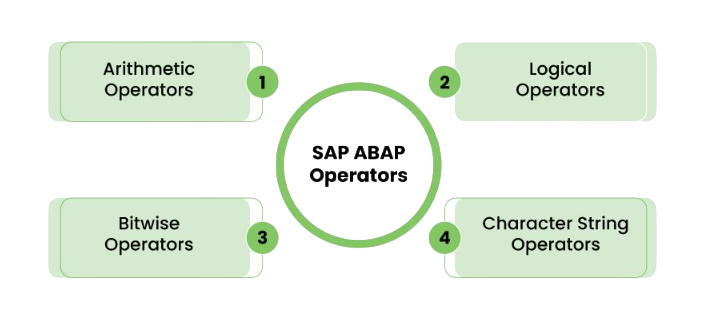
- Arithmetic Operators: Arithmetic operators perform mathematical calculations such as addition, subtraction, multiplication, and division. They are commonly used in business applications to calculate totals, balances, taxes, percentages, and various financial values during program execution.
- Comparison Operators: Comparison operators are used to compare values and determine whether specific conditions are true or false. They play a key role in decision-making logic by evaluating data and controlling program flow based on business requirements.and know more in SAP FICO Tutorial Step by Step For Freshers
- Logical Operators: Logical operators combine multiple conditions within a program. They help developers create complex decision-making scenarios by using operators such as AND, OR, and NOT to evaluate multiple business rules simultaneously.
- Conditional Statements: Conditional statements such as IF, ELSEIF, ELSE, and CASE allow programs to execute different actions based on specific conditions and konw about SAP MM Tutorial from Scratch For Freshers. These statements help automate business logic and support dynamic decision-making processes.
- Loop Statements: Loop statements such as DO, WHILE, and LOOP are used to execute a set of instructions repeatedly until a defined condition is met. They are especially useful when processing large amounts of business data efficiently.
Internal Tables, Structures, and Work Areas
- Internal Tables: Internal tables are temporary memory structures used to store and process multiple records during program execution. They function similarly to database tables and are widely used for data retrieval, manipulation, sorting, filtering, and reporting activities.
- Structures: Structures are collections of related fields grouped together under a single name. They help organize business data logically and make programs easier to understand, maintain, and process efficiently.
- Work Areas: A work area is a temporary storage location used to hold a single record of data and SAP SD Tutorial for Freshers. It acts as an interface between internal tables and processing logic, allowing developers to manipulate individual records effectively.
- Table Operations: ABAP provides operations such as APPEND, INSERT, MODIFY, DELETE, READ, and SORT for managing internal table data. These operations enable efficient data processing and support various business scenarios.
- Benefits in Programming: Using internal tables, structures, and work areas improves program performance, reduces database access, and enables faster processing of large datasets within SAP applications.

Open SQL and Database Operations
- Open SQL Overview: Open SQL is SAP database-independent language used to access and manipulate data stored in SAP database tables. It provides a consistent method for interacting with different database platforms.
- Data Retrieval: Statements such as SELECT are used to retrieve data from database tables. Developers can fetch single records, multiple records, or filtered datasets based on business requirements.
- Data Insertion: INSERT statements allow developers to add new records into database tables and SAP ABAP Tutorial with Examples For Beginners. This operation is commonly used when creating new business transactions or maintaining master data.
- Data Modification: UPDATE and MODIFY statements enable changes to existing database records. These operations help maintain accurate and up-to-date business information within SAP systems.
- Data Deletion: DELETE statements remove unwanted or obsolete records from database tables. Proper use of deletion operations helps maintain data quality and system efficiency.

Get JOB Oriented SAP ABAP Training for Beginners By MNC Experts
- Instructor-led Sessions
- Real-life Case Studies
- Assignments
ABAP Reports and ALV Reporting
ABAP reports are one of the most common types of applications developed in SAP systems. They are used to retrieve, process, and display business information in a structured format. Reports can range from simple lists to complex analytical outputs that support business decision-making. ALV (ABAP List Viewer) reporting enhances standard reports by providing interactive features such as sorting, filtering, searching, subtotaling, exporting, and customizing display layouts and SAP MM Tutorial For freshers. ALV reports improve user experience by allowing users to analyze data more effectively without additional programming. Organizations use ABAP reports and ALV extensively for operational reporting, management analysis, and business monitoring. Understanding report development is a fundamental skill for ABAP developers because reporting requirements are common across all SAP implementations.
Want to Master SAP ABAP? Explore the SAP ABAP Master Program Offered at ACTE Today!
Modularization Techniques in ABAP
Modularization in SAP ABAP is the process of breaking a large program into smaller, reusable, and logically structured components. This approach improves code readability, maintainability, reusability, and overall development efficiency. Instead of writing long and complex code in a single block, developers divide functionality into smaller units that can be independently developed, tested, and reused across different programs and SAP HANA Tutorial Complete Guide For Freshers.SAP ABAP provides several modularization techniques, including subroutines (FORM routines), function modules, methods in classes, and includes. Subroutines are used for internal code reuse within a program, while function modules are globally available and can be used across different applications, making them ideal for shared business logic. Methods support object-oriented programming and help organize code within classes, improving structure and scalability.
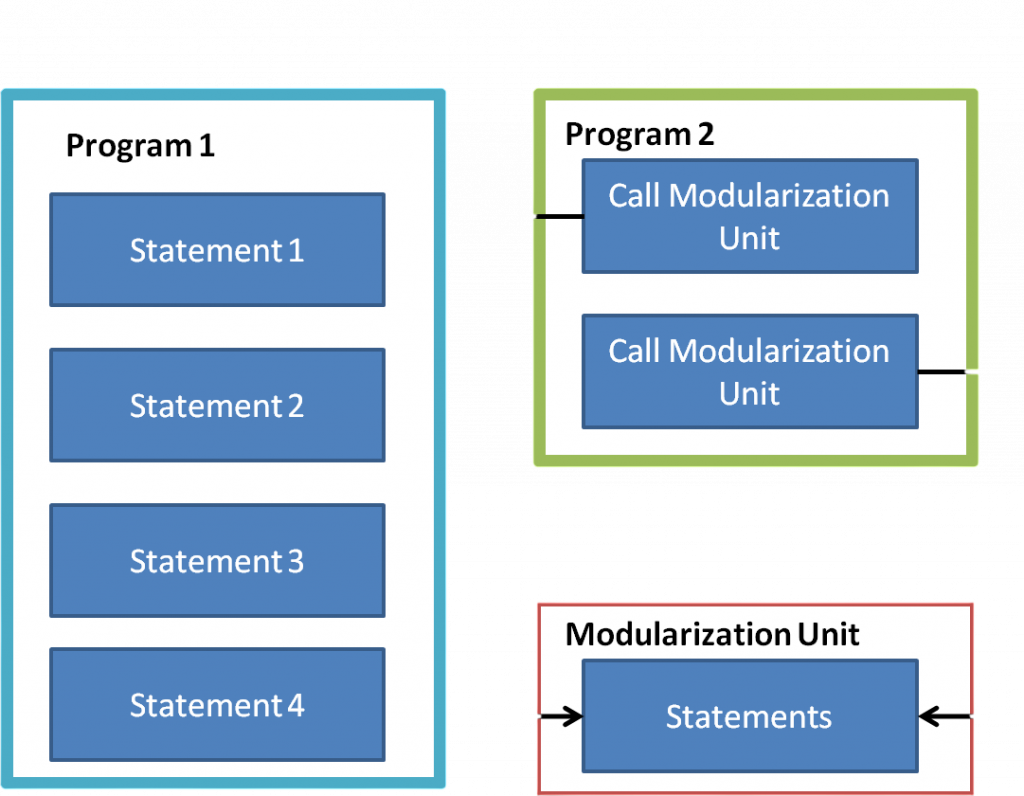
Includes are used to split large programs into multiple sections for better readability and maintenance.Modularization also plays a key role in reducing code duplication and improving system performance by promoting reusable logic. It simplifies debugging since issues can be isolated to specific modules rather than the entire program in SAP S4 HANA Tutorial. Additionally, it enhances teamwork in large development projects, as different developers can work on separate modules simultaneously without conflicts. Overall, modularization helps developers build scalable, efficient, and easy-to-maintain ABAP applications that can be enhanced and extended over time with minimal effort.
Want to Learn About SAP ABAP? Explore Our SAP ABAP Interview Questions and Answers Featuring the Most Frequently Asked Questions in Job Interviews.
Debugging and Error Handling in ABAP
Debugging is an essential activity in ABAP development that helps identify and resolve programming errors before applications are deployed. SAP provides powerful debugging tools that allow developers to execute programs step-by-step, inspect variable values, monitor data changes, and analyze program behavior in SAP ABAP Training. Effective debugging helps improve application quality and reduce production issues. Error handling techniques are equally important because they ensure that programs respond appropriately to unexpected situations such as invalid input, missing data, or system failures. ABAP provides mechanisms for handling exceptions, validating user input, and managing runtime errors. By implementing proper debugging and error-handling practices, developers can create stable, reliable, and user-friendly SAP applications that meet business requirements efficiently.
Conclusion and Next Steps in SAP ABAP
SAP ABAP provides the technical foundation for developing and customizing applications within SAP environments. By learning ABAP syntax, data structures, control statements, modularization techniques, reporting, and debugging concepts, beginners gain the skills required to build enterprise-grade SAP solutions in SAP ABAP Training. These core topics form the basis for more advanced development areas such as Object-Oriented ABAP, SAP Fiori development, CDS Views, OData services, SAP BTP, and SAP S/4HANA programming. Continued practice through real-world projects, coding exercises, and business scenarios is essential for strengthening development skills. As organizations continue to rely on SAP systems, ABAP remains a valuable and in-demand skill for professionals pursuing careers in SAP development and technical consulting.